Exadata

Exadata Smart Flash Log

Exadata Smart Flash Log: Eliminating Redo Log Bottlenecks in Oracle Exadata

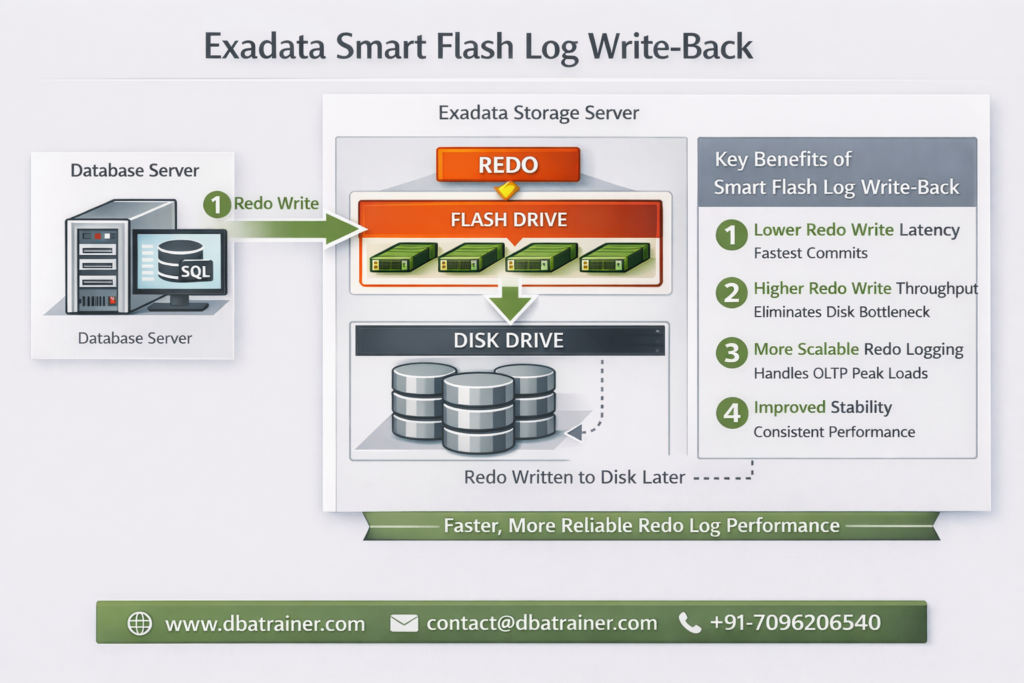
Exadata Smart Flash Log is designed to eliminate redo logging bottlenecks by accelerating performance-critical redo write operations in Oracle Exadata environments. In high-performance OLTP systems, transaction commit time is directly dependent on redo log write latency. Even small spikes in redo write latency can significantly impact response times and overall database throughput. What is Exadata Smart Flash Log? Exadata Smart Flash Log is a feature of Oracle Exadata that improves transaction response times by reducing redo log write latency using flash storage. Redo writes are extremely latency-sensitive because: Even though disk controllers use battery-backed DRAM cache, redo writes can still experience latency spikes when: Even a few slow redo writes can create noticeable performance degradation. How Exadata Smart Flash Log Works (Pre-20.1 Behavior) Before Oracle Exadata System Software 20.1, Exadata Smart Flash Log works as follows: Result: However, because redo must eventually persist to disk, overall logging throughput remained constrained by disk bandwidth. Smart Flash Log Write-Back (Introduced in 20.1) Starting with Oracle Exadata System Software 20.1, a major enhancement was introduced: Smart Flash Log Write-Back Instead of writing redo simultaneously to disk and flash, redo is written to: This removes disk as a bottleneck for redo logging. Benefits of Smart Flash Log Write-Back: This enhancement is particularly beneficial for: Why Exadata Smart Flash Log Is Important 1️⃣ Reduces log file sync Waits Commit response time improves immediately. 2️⃣ Eliminates Latency Spikes Parallel media writes prevent single-device delays from affecting commits. 3️⃣ Increases Database Throughput Higher redo throughput allows more transactions per second. 4️⃣ Improves Stability Under Load Performance remains consistent during peak I/O activity. Exadata Smart Flash Log vs Write-Back Flash Cache Feature Exadata Smart Flash Log Write-Back Flash Cache Applies To Redo logs Data files Improves Commit latency Data block write latency Wait Event Reduced log file sync db file parallel write Write Pattern Sequential Random 20.1 Enhancement Write-Back mode Already supported Use Case High commit OLTP Write-intensive workloads These features are complementary — not replacements. When Should You Investigate Exadata Smart Flash Log? Look at this feature if you observe: If redo is your bottleneck, Exadata Smart Flash Log is the solution. Final Thoughts Exadata Smart Flash Log is one of the most impactful performance optimizations available in Oracle Exadata for transaction-heavy environments. By reducing redo latency and eliminating logging bottlenecks, it: With the introduction of Smart Flash Log Write-Back in Exadata System Software 20.1, redo logging can now fully leverage flash performance — removing traditional disk limitations.

Exadata Smart Flash Log: Eliminating Redo Log Bottlenecks in Oracle Exadata Read More »
Write-Back Flash Cache in Oracle Exadata

Write-Back Flash Cache in Oracle Exadata

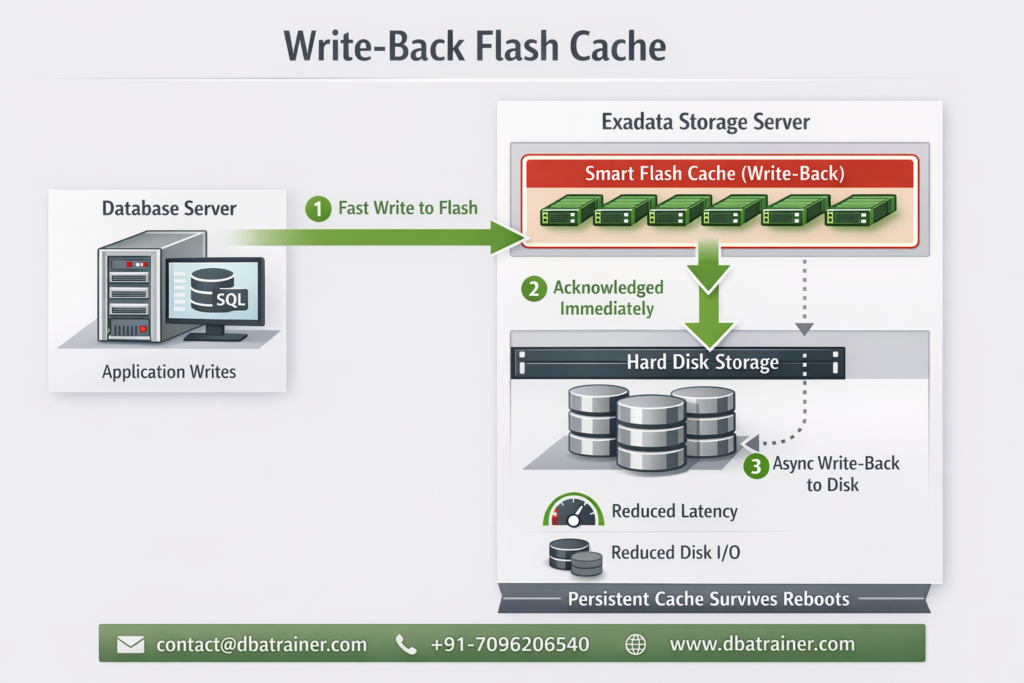
Write Back Flash Cache in Oracle Exadata is a performance optimization feature that allows database write operations to be temporarily stored on flash storage before being written to disk, significantly improving write latency and throughput. Modern enterprise databases demand low latency, high throughput, and predictable performance, especially for write-heavy workloads. To address this, Oracle Exadata introduced a powerful optimization known as Write-Back Flash Cache, enabling database writes to be absorbed directly by flash storage instead of slow spinning disks. Let’s break down what Write-Back Flash Cache is, why it matters, and when you should use it. Write-Back Flash Cache in Oracle Exadata Write-Back Flash Cache allows database write I/Os to be written first to Exadata Smart Flash Cache and later flushed to disk asynchronously. This capability was introduced with Oracle Exadata System Software release 11.2.3.2.0 and marked a major shift from traditional write-through behavior. Traditional Write-Through (Before) Writes go directly to disk Flash is mainly used for reads Higher latency for write-intensive workloads Write-Back Mode Writes land in flash first Disk writes happen later in the background Applications see much faster write response times Why Write-Back Flash Cache Matters 1. Ultra-Low Write Latency Flash devices offer microsecond-level latency, far outperforming spinning disks. By absorbing writes in flash: Commit times drop I/O wait events reduce Overall database responsiveness improves This is especially beneficial when you see: High I/O latency Frequent free buffer waits Write bottlenecks during peak workloads 2. Ideal for Write-Intensive Applications Workloads that benefit the most include: OLTP systems Financial transaction platforms Batch processing with frequent updates Index-heavy applications If your application writes aggressively, Write-Back Flash Cache can deliver immediate performance gains without application changes. 3. Reduced Disk I/O and Better Bandwidth Utilization One of the hidden superpowers of Write-Back mode is I/O coalescing. Multiple writes to the same block are absorbed in flash Only the final version is written to disk Disk I/O volume is significantly reduced This saved disk bandwidth can then be used to: Increase application throughput Support additional workloads Improve system scalability Persistence Across Reboots — No Cache Warm-Up Unlike traditional caches, Write-Back Flash Cache is persistent. Cache contents survive storage server reboots No warm-up period is required Performance remains consistent after restarts This is a huge operational advantage in mission-critical environments. Data Protection Considerations Write-Back mode introduces an important responsibility. What Happens If Flash Fails? If a flash device fails before dirty data is written to disk, that data must be recovered from a mirror copy. Oracle’s Recommendation To safely use Write-Back Flash Cache: Enable High Redundancy (Triple Mirroring) Ensure database files are protected against flash failure This makes Write-Back mode enterprise-safe while preserving performance benefits. When Should You Enable Write-Back Flash Cache? You should strongly consider it if: Your workload is write-heavy You experience high write latency Disk I/O is a performance bottleneck You are using high redundancy for storage You may avoid it if: Your workload is mostly read-only You cannot tolerate any dependency on flash redundancy You are using low redundancy configurations Final Thoughts Write-Back Flash Cache transforms Exadata into a write-optimized platform, delivering faster commits, reduced disk I/O, and higher throughput—all without application changes. When combined with proper redundancy, it offers the best of both worlds: Flash-level performance Enterprise-grade reliability For serious database workloads on Exadata, Write-Back Flash Cache is not just an optimization—it’s a competitive advantage. Feature Write-Through Write-Back Write Path Disk first Flash first Latency Higher Very low Disk I/O High Reduced Performance Moderate Excellent Risk Minimal Needs redundancy Write-Back Flash Cache accelerates data file writes, not redo logs. Redo logs always bypass flash cache and write directly to disk for durability. What is Exadata Smart Flash Log? Exadata Smart Flash Log is a feature that accelerates redo log writes by using flash as a low-latency write destination, while still guaranteeing full redo durability. In short: Smart Flash Log = fast redo commits Write-Back Flash Cache = fast data block writes We will discuss more about Exadata Smart Flash Log in Next Blog…!!!!

Write-Back Flash Cache in Oracle Exadata Read More »

XRMEM in Exadata

From PMEM to XRMEM in Exadata

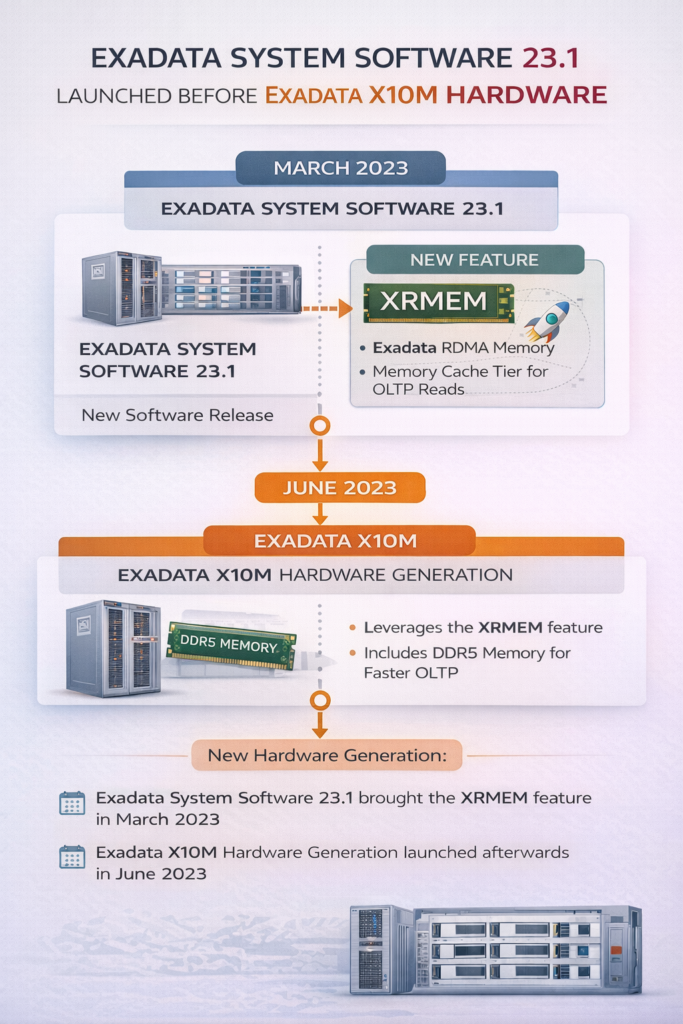
How Exadata Evolved from Persistent Memory  PMEM to a Modern Memory Architecture – XRMEM Oracle Exadata has always focused on one goal: moving data faster between storage and the database. XRMEM Exadata represents a major leap in Oracle Exadata architecture, evolving from traditional PMEM-based designs to RDMA-backed memory access. The original problem Oracle Exadata wanted to solve:- Traditional database I/O looks like this: Storage → OS Kernel → TCP/IP → CPU → Database This path causes: High latency CPU overhead Multiple memory copies Even fast flash storage became a bottleneck for: High-concurrency OLTP RAC workloads Commit-heavy systems Exadata needed data closer to the database and faster than flash. Step 1: PMEM (Exadata X8M / X9M) What was PMEM? PMEM (Persistent Memory) was a special type of memory installed in Exadata storage servers. PMEM was: Non-volatile (data survives power loss) Much faster than flash Slightly slower than DRAM How PMEM was used PMEM acted as a very fast storage layer: Hot data blocks were cached in PMEM Redo was written to PMEM for faster commits RDMA was used to access PMEM quickly This gave Exadata microsecond-level I/O latency for the first time. Why PMEM was not the final solution PMEM worked very well, but it had drawbacks: Specialized hardware Limited vendor ecosystem Memory technology evolves quickly Oracle realized something important: Performance should not depend on one specific memory technology. So instead of building Exadata around PMEM forever, Oracle focused on architecture. Read more about PMEM on – https://dbatrainer.com/pmem-and-rdma-in-oracle-exadata-x8m-and-x9m/ Step 2: Introduction of XRMEM (the architectural shift) XRMEM Exadata Architecture Overview XRMEM (Exadata RDMA Memory) is not hardware. XRMEM is a software-defined memory architecture that uses RDMA to allow the database server to directly access memory on storage servers with ultra-low latency. Key idea: XRMEM defines how memory is accessed It does not care what type of memory is used How PMEM and XRMEM are related:- This is the most important clarification. Concept What it is PMEM A type of hardware memory XRMEM A software architecture In Exadata X8M and X9M: XRMEM used PMEM as its backend So people often thought: PMEM = XRMEM But that was never architecturally true. Step 3: Formal naming change (System Software 23.1) Oracle made the architecture explicit: Old Name New Name PMEMCACHE XRMEMCACHE PMEMLOG XRMEMLOG Why this mattered: PMEM was positioned as one implementation XRMEM was positioned as the long-term design Backward compatibility was preserved Step 4: PMEM removed, DRAM adopted (Exadata X10M and later) What changed in X10M? PMEM hardware was removed XRMEM remained XRMEM now uses high-performance DDR5 DRAM Is DRAM volatile? Yes , DRAM is volatile, unlike PMEM. This leads to the common question: Does this break data safety? Why volatile DRAM does NOT cause data loss:- XRMEM is used as: A cache A performance acceleration layer It is not the system of record. Data durability is still guaranteed by: Redo logs Flash storage Disk storage Oracle Database recovery mechanisms If a storage server restarts: XRMEM cache is rebuilt automatically No committed data is lost No DBA action is required XRMEM improves speed, not durability. Durability is handled elsewhere XRMEM today:- What XRMEM does Caches the hottest OLTP data Accelerates small block reads Reduces latency to ~14–17 microseconds Uses RDMA to bypass OS and network stacks What XRMEM does NOT do It does not replace redo logs It does not store permanent data It does not change Oracle Database behavior PMEM → XRMEM evolution timeline:- Exadata Version Backend Memory Volatility Architecture X8M / X9M PMEM Non-volatile XRMEM (implicit) X10M / X11M DRAM Volatile XRMEM (explicit) The architecture stayed. The memory technology changed. Why Oracle moved from PMEM to DRAM:- Oracle chose DRAM because it is: Faster More scalable Widely available Cost-effective Easier to evolve By combining: DRAM RDMA XRMEM software intelligence Exadata achieved better performance than PMEM, without hardware dependency Final simple explanation:- PMEM was a special memory used in early Exadata systems.XRMEM is the software architecture that made PMEM useful. Today, XRMEM uses DRAM instead of PMEM, but delivers the same or better performance while keeping data safe.

From PMEM to XRMEM in Exadata Read More »

PMEM and RDMA architecture in Oracle Exadata

PMEM and RDMA in Oracle Exadata X8M and X9M

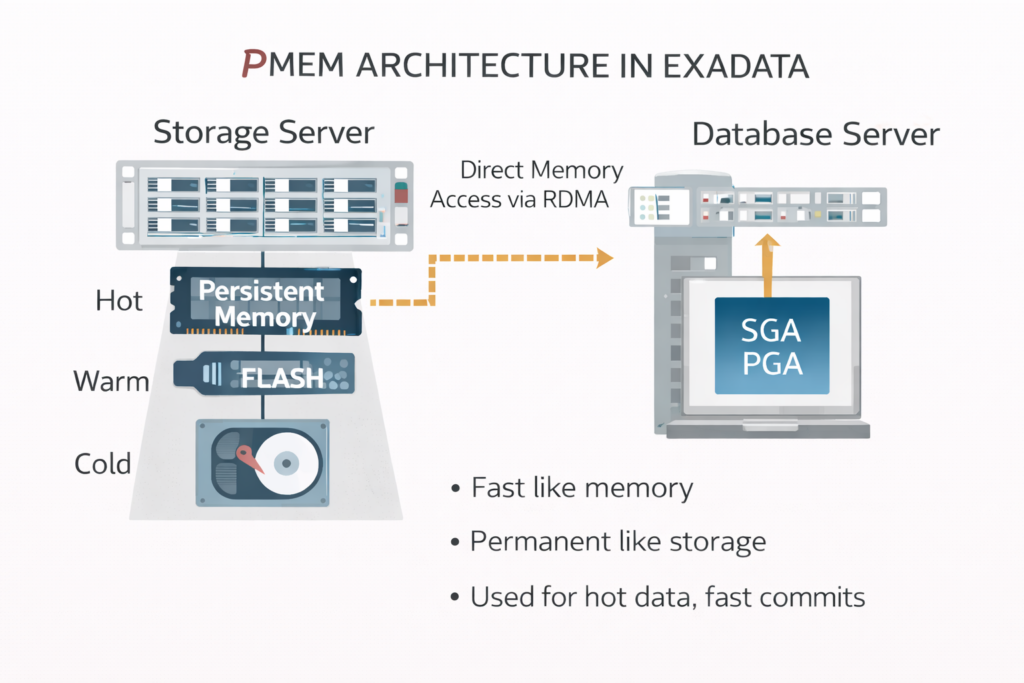
How Persistent Memory and RDMA Redefined Database I/O Performance Modern Oracle Exadata systems introduced a major shift in database I/O architecture with the use of Persistent Memory (PMEM) and Remote Direct Memory Access (RDMA). Together, these technologies significantly reduced I/O latency, CPU overhead, and data movement between storage and database servers. This blog explains what PMEM and RDMA are, why they were introduced, and how they work together in Exadata. Why traditional storage was no longer enough..? Before Exadata X8M, even with NVMe flash, database I/O followed this path: Storage → OS Kernel → TCP/IP → CPU → Database This introduced: Multiple memory copies Kernel context switches High CPU usage Network stack latency As databases became: More latency-sensitive (OLTP) Highly concurrent Mixed with analytics Flash alone could not deliver consistent microsecond performance. This led Oracle to introduce PMEM for speed and RDMA for transport. What is PMEM (Persistent Memory)? Persistent Memory (PMEM) is a storage-class memory technology that combines the speed of memory with the persistence of storage. Key characteristics of PMEM Non-volatile (data survives power loss) Much faster than NVMe flash Slower than DRAM, but close Byte-addressable In Exadata, PMEM is installed inside storage servers and is managed entirely by Exadata software. How PMEM is used in Exadata.? PMEM acts as a new tier in the storage hierarchy: Data Temperature Storage Tier Hot PMEM Warm NVMe Flash Cold Disk PMEM use cases in Exadata Caching frequently accessed data blocks Accelerating Smart Scan reads Speeding up redo log commits PMEM allows Exadata to keep hot data extremely close to the database, without sacrificing durability. What is RDMA (Remote Direct Memory Access)? RDMA is a networking technology that allows one server to directly access memory on another server, bypassing: Operating system kernel TCP/IP stack Remote CPU involvement Exadata uses RoCE (RDMA over Converged Ethernet). Key benefits of RDMA Microsecond-level latency Zero-copy data transfers Very low CPU usage Predictable performance under load RDMA is not storage or memory—it is the transport mechanism. Traditional I/O vs RDMA-based I/O Traditional TCP/IP I/O Storage → Kernel → CPU → Network → CPU → Kernel → Database RDMA-based I/O Storage Memory → Database Memory (Direct) RDMA removes multiple layers from the data path, making memory access across servers almost as fast as local access. How PMEM and RDMA work together in Exadata PMEM and RDMA solve different problems, but complement each other perfectly. PMEM provides a fast, persistent place to store data RDMA provides the fastest possible way to move that data Simplified architecture PMEM (Storage Server)    ↓ RDMA Database Server Memory With this design: Data is read directly from PMEM RDMA transfers it without CPU or kernel overhead Latency drops to microseconds PMEM + RDMA for read operations For large scans and analytics: Data resides in PMEM Database server requests data RDMA transfers data directly from PMEM Only relevant rows and columns are returned This dramatically reduces: I/O volume Database CPU usage Query response time PMEM + RDMA for write operations (commits) For commit-heavy OLTP workloads: Redo is written to PMEM (non-volatile) Commit is acknowledged immediately Data is later flushed to flash or disk asynchronously This results in: Faster commits Lower log file sync waits No loss of durability Why PMEM + RDMA was a breakthrough Together, PMEM and RDMA delivered: Up to 10x lower latency Higher throughput Better RAC scalability More predictable performance Most importantly: Performance gains came without application or schema changes. PMEM and RDMA scope in Exadata PMEM is available in:   Exadata X8M Exadata X9M RDMA remains a core transport technology in Exadata Both are fully integrated and automatically managed DBAs do not need to: Tune applications Modify SQL Manage memory tiers manually Simple analogy PMEM → A high-speed, persistent warehouse RDMA → A frictionless express highway Database server → The consumer of data The faster the warehouse and highway, the faster the business runs. One-line summary PMEM provides fast, persistent storage close to the database, and RDMA deliver it with minimal latency and CPU overhead. Final takeaway PMEM and RDMA together marked a fundamental redesign of database I/O in Oracle Exadata. Instead of pushing more data through traditional storage stacks, Exadata brought data: Closer to the database Faster than flash With minimal overhead This architecture laid the foundation for everything that followed in modern Exadata systems.

PMEM and RDMA in Oracle Exadata X8M and X9M Read More »