DBA Trainer

oracle vector search

Oracle AI Database 26ai Vector Search

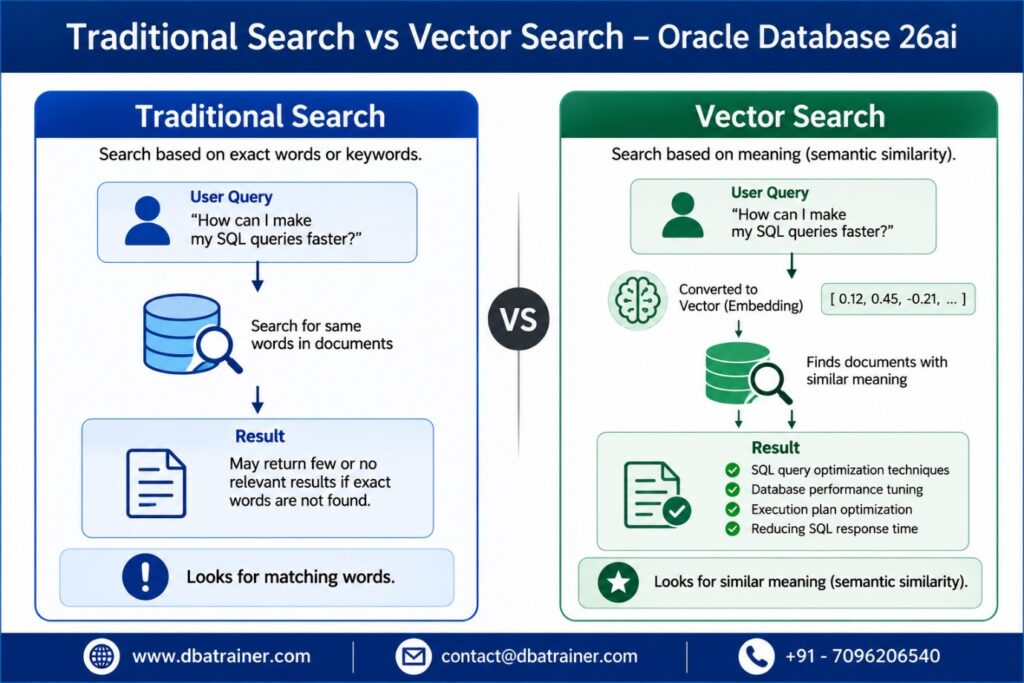
From Traditional Search to Semantic Search,Embeddings and Vectors  Artificial Intelligence is changing the way applications search and understand information.Traditionally, databases search information using exact values, keywords, filters, and conditions. This works very well when we know exactly what we are looking for. But what if we want to search based on the meaning of the information rather than just matching words? This is where Vector Search comes into the picture. Oracle AI Database 26ai provides native AI Vector Search, which allows applications to search information based on semantic similarity. 1. What is Traditional Search? Let’s start with something familiar. Suppose we have an employee table and want to find employees from the IT department. We can simply run: SELECT * FROM employees WHERE department = ‘IT’; Here, the database checks the value of the department column and returns rows where the value is IT. We can also search text. For example: SELECT * FROM documents WHERE document_text LIKE ‘%performance%’; Here, the database is looking for the word performance.  This is essentially keyword-based search. The database is asking: “Does this data contain the word or value that I am searching for?” This approach works very well for many traditional database applications. But there is a limitation. 2. The Problem with Keyword Search? Imagine that a user asks: “How can I make my SQL queries faster?” Now suppose we have a document containing: “SQL query optimization techniques can reduce execution time and improve database performance.” A human immediately understands that this document is relevant to the user’s question. But notice that the words are different.  The user said: “Make SQL queries faster” The document says: “SQL query optimization” Both have a similar meaning. A traditional keyword search may not understand this relationship effectively because it primarily looks for matching words. Consider a few more examples: User Query Document Make SQL queries faster SQL query optimization Database is slow Database performance tuning Improve query response time Execution plan optimization Humans understand that these statements are related. But how can a computer understand the relationship?  This is where Semantic Search comes in. 3. What is  Semantic Search? Semantic search means searching based on the meaning or context of information rather than only looking for exact keywords.For example, suppose a user searches: “Find information about making SQL queries faster.” A semantic search system could identify documents related to: SQL performance tuning Query optimization Execution plan optimization SQL response-time improvement Database performance Notice that the exact words don’t necessarily have to be the same. The system is trying to identify information that has a similar meaning. This is the fundamental idea behind Vector Search. 4. How Does a Computer Understand Meaning?   Now comes an important question. How can a computer understand that: “Make SQL queries faster” and “SQL query optimization” are related? This is where AI models come into the picture. An AI model called an embedding model can convert text into a numerical representation called an embedding. For example: Text: Oracle database performance tuning can be converted into something conceptually similar to: [0.21, -0.34, 0.87, 0.12, …] Another sentence: SQL query optimization could be represented by another set of numbers. These numbers are not simply keywords. Together, they represent characteristics of the information that allow AI systems to compare different pieces of data mathematically. Depending on the embedding model, a vector can contain hundreds or even thousands of numbers. 5. What is  an Embedding? An embedding is a numerical representation of information. In simple terms: Text → Embedding Model → Vector For example: Oracle RAC performance           ↓  Embedding Model           ↓ [0.12, 0.45, -0.21, 0.87, …] The embedding model converts the original information into a form that a computer can mathematically compare. Embeddings can be generated for different types of information, including: Text Documents Images Other unstructured data The important concept to remember is: An embedding converts information into numbers so that similarity can be calculated. 6. What is a Vector?  Now we can understand the term Vector. In simple terms: A vector is an ordered collection of numbers. For example: [0.12, 0.45, 0.87, 0.23] This vector contains four numbers, so we can say it has four dimensions. Another vector might look like: [0.10, 0.42, 0.90, 0.21] These two vectors are mathematically close to each other. When vectors represent text or other information, being close can indicate that the underlying information is semantically similar. This is the basic foundation of Vector Search. A simple way to remember it is: Text is converted into an embedding, and the embedding is represented as a vector. 7. A Simple Real-world Example   Let’s take a simple shopping example. Imagine an online shopping application with these products: Running Shoes Formal Leather Shoes Sports Sneakers Office Chair Cricket Bat Now the customer searches: “Shoes for jogging” A traditional keyword search might look for the words: Shoes Jogging But a Vector Search system can convert the search query into a vector and compare it with vectors representing the products. The results could look conceptually like: Running Shoes          → Very Similar Sports Sneakers        → Similar Formal Leather Shoes   → Less Similar Office Chair            → Not Similar Cricket Bat             → Not Similar The important point is that the system is not simply checking whether the exact words exist. It is trying to identify similar meaning. 8. How Does Oracle AI Database 26 ai Fit in? Now let’s bring Oracle into the picture. Oracle AI Database 26ai provides native capabilities for storing and searching vector data within the database. A simplified architecture looks like this:                 Source Data                     ↓           Documents / Text / Data                      ↓              Embedding Model                      ↓                   Vector                      ↓         Oracle AI Database 26ai                             Business Data                            Documents                                VECTOR Data                                       ↓             Similarity Search This means the vector representation of information can be stored and searched inside Oracle Database alongside traditional business data. For organizations already using Oracle Database, this can be very interesting because AI search capabilities can be integrated with existing database data and applications. 9. What is Oracle  26ai VECTOR Data Type  One of the

Oracle AI Database 26ai Vector Search Read More »
ExaCC ExaCS Exadata Oracle Database

Oracle Exadata Cloud@Customer (ExaCC) and Oracle Exadata Cloud Service (ExaCS)

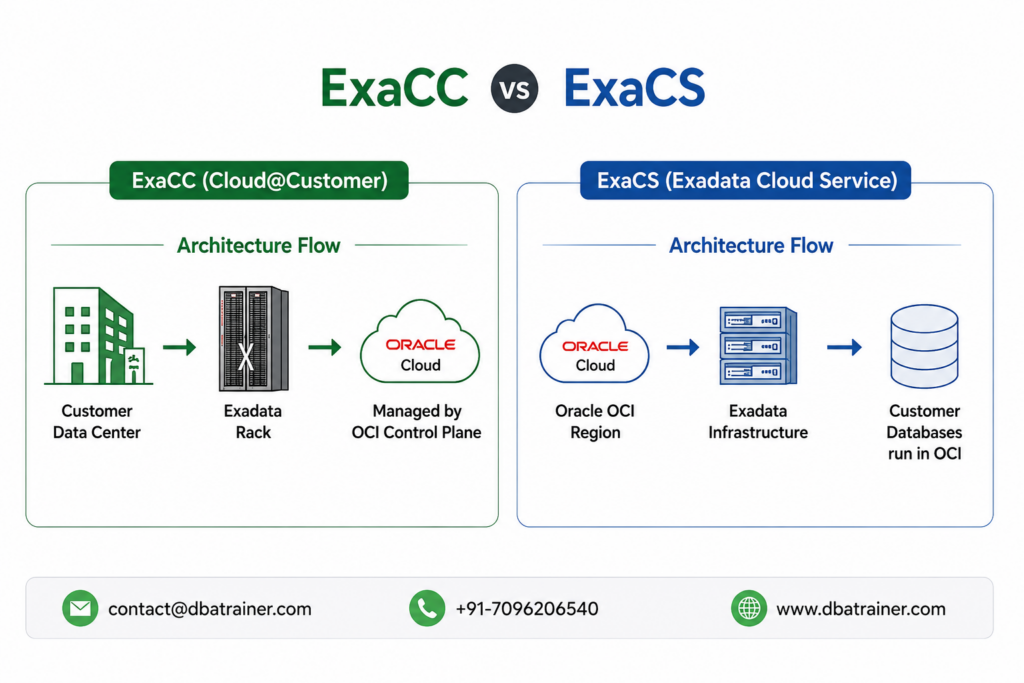
ExaCC is Oracle Exadata installed in customer premises but managed as a cloud service through OCI, whereas ExaCS is Exadata infrastructure fully hosted and managed inside Oracle Cloud Infrastructure regions. ExaCC is preferred for data residency and low-latency on-prem requirements, while ExaCS is preferred for full cloud adoption and elastic scalability. ExaCC (Cloud@Customer) Oracle installs Exadata rack physically at customer site. Architecture Flow :-  Customer Data Center –> Exadata Rack  –> Managed by OCI Control Plane Customer get: Best when: Example: A bank wants Exadata cloud benefits but cannot move customer data outside their own DC. Think Like – OCI Cloud services running INSIDE customer data center ExaCS (Exadata Cloud Service) Everything stays in Oracle cloud. Architecture Flow : Oracle OCI Region –> Exadata Infrastructure –> Customer databases run in OCI Best when: Example:A SaaS company hosting production Oracle databases fully in OCI. Think Like – Exadata running directly inside Oracle OCI. Comparison Table :-   ExaCC vs ExaCS       Feature ExaCC ExaCS Full Form Exadata Cloud@Customer Exadata Cloud Service Deployment Location Customer Data Center (On-Premises) Oracle Cloud Infrastructure (OCI) Hardware Ownership Oracle-owned and managed hardware installed at customer site Oracle-owned hardware inside OCI regions Physical Location Inside your company DC Inside Oracle OCI DC Cloud Experience Yes Yes Control Plane Connected to OCI Native OCI Connectivity Requirement Requires OCI connectivity Already inside OCI Data Residency Data stays inside customer premises Data stored in OCI Best For Regulatory / data sovereignty needs Full cloud adoption Latency to On-P Apps Very low Depends on network connectivity Infrastructure Management Oracle manages hardware/software Oracle manages hardware/software Scalability Limited by installed rack capacity Highly elastic Expansion Need physical expansion Easier online scaling Cost Model Subscription + on-prem install Pure cloud subscription Internet Dependency Less external dependency Cloud dependent Disaster Recovery Usually customer-managed or OCI hybrid OCI-native DR options Typical Users Banks, government, healthcare Cloud-native enterprises Operational Difference:-   Task ExaCC ExaCS Rack Installation Oracle installs at customer site Already available in OCI Power/Cooling Customer responsibility Oracle responsibility Physical Security Customer DC Oracle DC Hardware Replacement Oracle field engineers visit customer site Oracle internal Capacity Increase Physical rack expansion OCI scaling  

Oracle Exadata Cloud@Customer (ExaCC) and Oracle Exadata Cloud Service (ExaCS) Read More »

Exadata Smart Flash Log

Exadata Smart Flash Log: Eliminating Redo Log Bottlenecks in Oracle Exadata

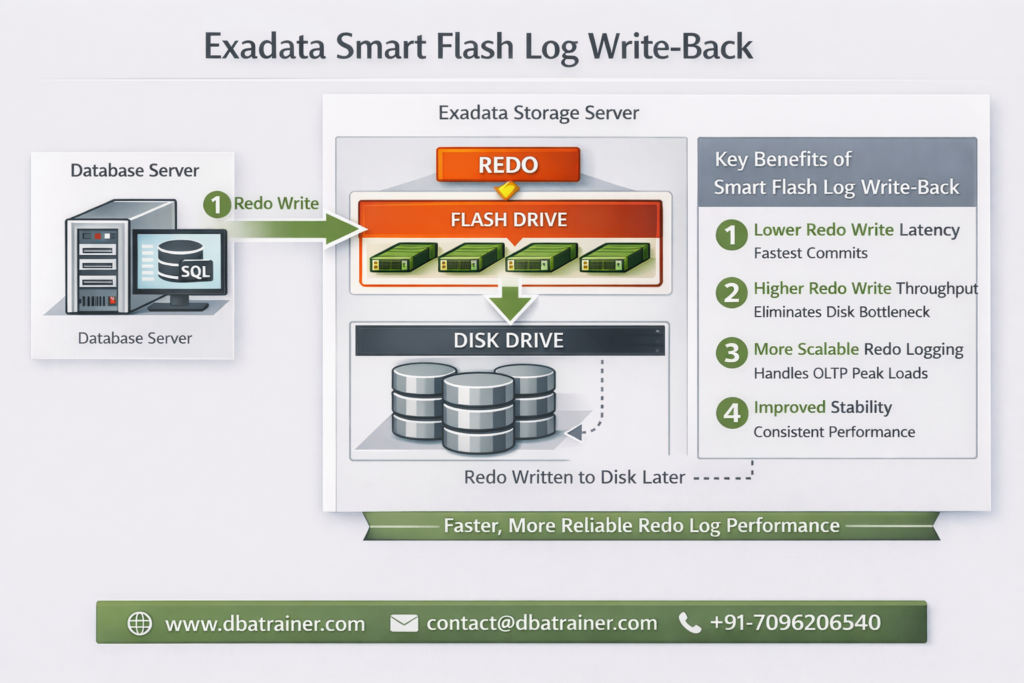
Exadata Smart Flash Log is designed to eliminate redo logging bottlenecks by accelerating performance-critical redo write operations in Oracle Exadata environments. In high-performance OLTP systems, transaction commit time is directly dependent on redo log write latency. Even small spikes in redo write latency can significantly impact response times and overall database throughput. What is Exadata Smart Flash Log? Exadata Smart Flash Log is a feature of Oracle Exadata that improves transaction response times by reducing redo log write latency using flash storage. Redo writes are extremely latency-sensitive because: Even though disk controllers use battery-backed DRAM cache, redo writes can still experience latency spikes when: Even a few slow redo writes can create noticeable performance degradation. How Exadata Smart Flash Log Works (Pre-20.1 Behavior) Before Oracle Exadata System Software 20.1, Exadata Smart Flash Log works as follows: Result: However, because redo must eventually persist to disk, overall logging throughput remained constrained by disk bandwidth. Smart Flash Log Write-Back (Introduced in 20.1) Starting with Oracle Exadata System Software 20.1, a major enhancement was introduced: Smart Flash Log Write-Back Instead of writing redo simultaneously to disk and flash, redo is written to: This removes disk as a bottleneck for redo logging. Benefits of Smart Flash Log Write-Back: This enhancement is particularly beneficial for: Why Exadata Smart Flash Log Is Important 1️⃣ Reduces log file sync Waits Commit response time improves immediately. 2️⃣ Eliminates Latency Spikes Parallel media writes prevent single-device delays from affecting commits. 3️⃣ Increases Database Throughput Higher redo throughput allows more transactions per second. 4️⃣ Improves Stability Under Load Performance remains consistent during peak I/O activity. Exadata Smart Flash Log vs Write-Back Flash Cache Feature Exadata Smart Flash Log Write-Back Flash Cache Applies To Redo logs Data files Improves Commit latency Data block write latency Wait Event Reduced log file sync db file parallel write Write Pattern Sequential Random 20.1 Enhancement Write-Back mode Already supported Use Case High commit OLTP Write-intensive workloads These features are complementary — not replacements. When Should You Investigate Exadata Smart Flash Log? Look at this feature if you observe: If redo is your bottleneck, Exadata Smart Flash Log is the solution. Final Thoughts Exadata Smart Flash Log is one of the most impactful performance optimizations available in Oracle Exadata for transaction-heavy environments. By reducing redo latency and eliminating logging bottlenecks, it: With the introduction of Smart Flash Log Write-Back in Exadata System Software 20.1, redo logging can now fully leverage flash performance — removing traditional disk limitations.

Exadata Smart Flash Log: Eliminating Redo Log Bottlenecks in Oracle Exadata Read More »

Write-Back Flash Cache in Oracle Exadata

Write-Back Flash Cache in Oracle Exadata

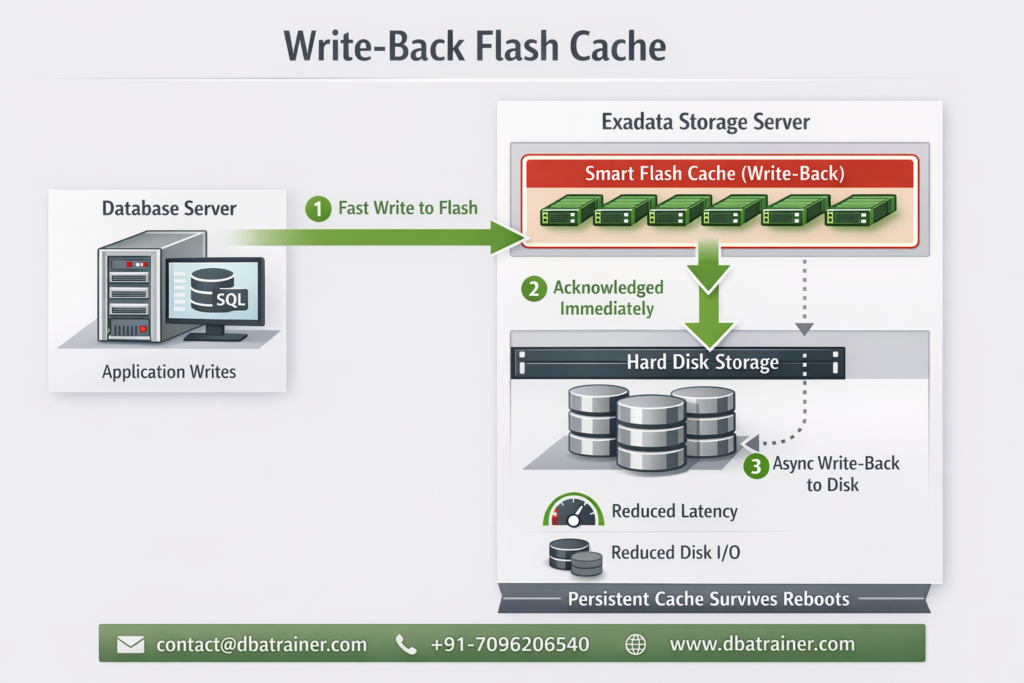
Write Back Flash Cache in Oracle Exadata is a performance optimization feature that allows database write operations to be temporarily stored on flash storage before being written to disk, significantly improving write latency and throughput. Modern enterprise databases demand low latency, high throughput, and predictable performance, especially for write-heavy workloads. To address this, Oracle Exadata introduced a powerful optimization known as Write-Back Flash Cache, enabling database writes to be absorbed directly by flash storage instead of slow spinning disks. Let’s break down what Write-Back Flash Cache is, why it matters, and when you should use it. Write-Back Flash Cache in Oracle Exadata Write-Back Flash Cache allows database write I/Os to be written first to Exadata Smart Flash Cache and later flushed to disk asynchronously. This capability was introduced with Oracle Exadata System Software release 11.2.3.2.0 and marked a major shift from traditional write-through behavior. Traditional Write-Through (Before) Writes go directly to disk Flash is mainly used for reads Higher latency for write-intensive workloads Write-Back Mode Writes land in flash first Disk writes happen later in the background Applications see much faster write response times Why Write-Back Flash Cache Matters 1. Ultra-Low Write Latency Flash devices offer microsecond-level latency, far outperforming spinning disks. By absorbing writes in flash: Commit times drop I/O wait events reduce Overall database responsiveness improves This is especially beneficial when you see: High I/O latency Frequent free buffer waits Write bottlenecks during peak workloads 2. Ideal for Write-Intensive Applications Workloads that benefit the most include: OLTP systems Financial transaction platforms Batch processing with frequent updates Index-heavy applications If your application writes aggressively, Write-Back Flash Cache can deliver immediate performance gains without application changes. 3. Reduced Disk I/O and Better Bandwidth Utilization One of the hidden superpowers of Write-Back mode is I/O coalescing. Multiple writes to the same block are absorbed in flash Only the final version is written to disk Disk I/O volume is significantly reduced This saved disk bandwidth can then be used to: Increase application throughput Support additional workloads Improve system scalability Persistence Across Reboots — No Cache Warm-Up Unlike traditional caches, Write-Back Flash Cache is persistent. Cache contents survive storage server reboots No warm-up period is required Performance remains consistent after restarts This is a huge operational advantage in mission-critical environments. Data Protection Considerations Write-Back mode introduces an important responsibility. What Happens If Flash Fails? If a flash device fails before dirty data is written to disk, that data must be recovered from a mirror copy. Oracle’s Recommendation To safely use Write-Back Flash Cache: Enable High Redundancy (Triple Mirroring) Ensure database files are protected against flash failure This makes Write-Back mode enterprise-safe while preserving performance benefits. When Should You Enable Write-Back Flash Cache? You should strongly consider it if: Your workload is write-heavy You experience high write latency Disk I/O is a performance bottleneck You are using high redundancy for storage You may avoid it if: Your workload is mostly read-only You cannot tolerate any dependency on flash redundancy You are using low redundancy configurations Final Thoughts Write-Back Flash Cache transforms Exadata into a write-optimized platform, delivering faster commits, reduced disk I/O, and higher throughput—all without application changes. When combined with proper redundancy, it offers the best of both worlds: Flash-level performance Enterprise-grade reliability For serious database workloads on Exadata, Write-Back Flash Cache is not just an optimization—it’s a competitive advantage. Feature Write-Through Write-Back Write Path Disk first Flash first Latency Higher Very low Disk I/O High Reduced Performance Moderate Excellent Risk Minimal Needs redundancy Write-Back Flash Cache accelerates data file writes, not redo logs. Redo logs always bypass flash cache and write directly to disk for durability. What is Exadata Smart Flash Log? Exadata Smart Flash Log is a feature that accelerates redo log writes by using flash as a low-latency write destination, while still guaranteeing full redo durability. In short: Smart Flash Log = fast redo commits Write-Back Flash Cache = fast data block writes We will discuss more about Exadata Smart Flash Log in Next Blog…!!!!

Write-Back Flash Cache in Oracle Exadata Read More »

XRMEM in Exadata

From PMEM to XRMEM in Exadata

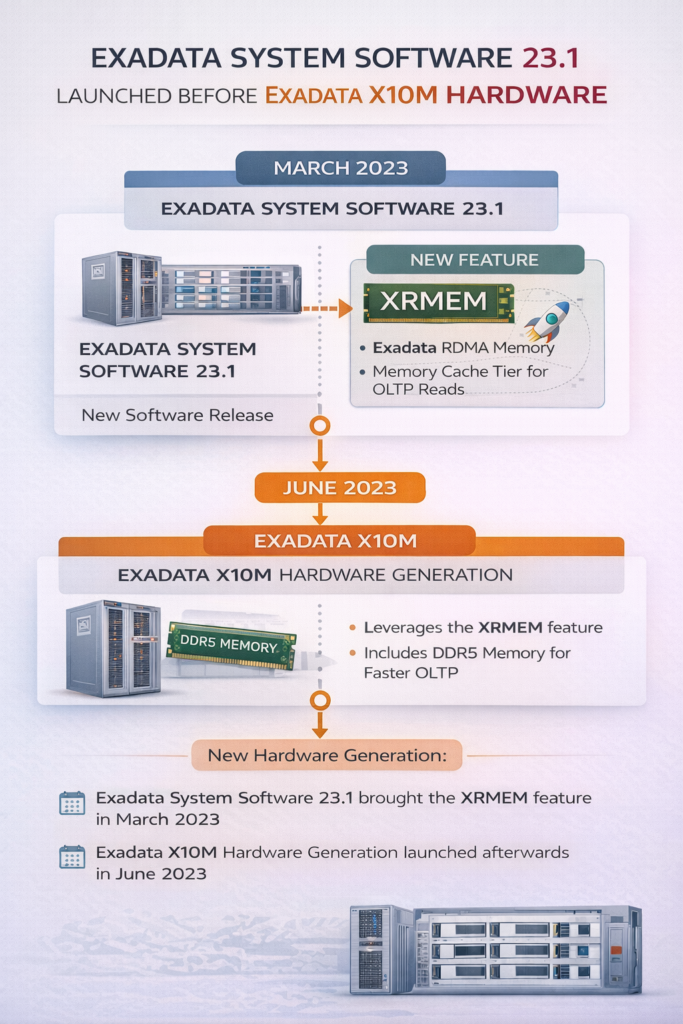
How Exadata Evolved from Persistent Memory  PMEM to a Modern Memory Architecture – XRMEM Oracle Exadata has always focused on one goal: moving data faster between storage and the database. XRMEM Exadata represents a major leap in Oracle Exadata architecture, evolving from traditional PMEM-based designs to RDMA-backed memory access. The original problem Oracle Exadata wanted to solve:- Traditional database I/O looks like this: Storage → OS Kernel → TCP/IP → CPU → Database This path causes: High latency CPU overhead Multiple memory copies Even fast flash storage became a bottleneck for: High-concurrency OLTP RAC workloads Commit-heavy systems Exadata needed data closer to the database and faster than flash. Step 1: PMEM (Exadata X8M / X9M) What was PMEM? PMEM (Persistent Memory) was a special type of memory installed in Exadata storage servers. PMEM was: Non-volatile (data survives power loss) Much faster than flash Slightly slower than DRAM How PMEM was used PMEM acted as a very fast storage layer: Hot data blocks were cached in PMEM Redo was written to PMEM for faster commits RDMA was used to access PMEM quickly This gave Exadata microsecond-level I/O latency for the first time. Why PMEM was not the final solution PMEM worked very well, but it had drawbacks: Specialized hardware Limited vendor ecosystem Memory technology evolves quickly Oracle realized something important: Performance should not depend on one specific memory technology. So instead of building Exadata around PMEM forever, Oracle focused on architecture. Read more about PMEM on – https://dbatrainer.com/pmem-and-rdma-in-oracle-exadata-x8m-and-x9m/ Step 2: Introduction of XRMEM (the architectural shift) XRMEM Exadata Architecture Overview XRMEM (Exadata RDMA Memory) is not hardware. XRMEM is a software-defined memory architecture that uses RDMA to allow the database server to directly access memory on storage servers with ultra-low latency. Key idea: XRMEM defines how memory is accessed It does not care what type of memory is used How PMEM and XRMEM are related:- This is the most important clarification. Concept What it is PMEM A type of hardware memory XRMEM A software architecture In Exadata X8M and X9M: XRMEM used PMEM as its backend So people often thought: PMEM = XRMEM But that was never architecturally true. Step 3: Formal naming change (System Software 23.1) Oracle made the architecture explicit: Old Name New Name PMEMCACHE XRMEMCACHE PMEMLOG XRMEMLOG Why this mattered: PMEM was positioned as one implementation XRMEM was positioned as the long-term design Backward compatibility was preserved Step 4: PMEM removed, DRAM adopted (Exadata X10M and later) What changed in X10M? PMEM hardware was removed XRMEM remained XRMEM now uses high-performance DDR5 DRAM Is DRAM volatile? Yes , DRAM is volatile, unlike PMEM. This leads to the common question: Does this break data safety? Why volatile DRAM does NOT cause data loss:- XRMEM is used as: A cache A performance acceleration layer It is not the system of record. Data durability is still guaranteed by: Redo logs Flash storage Disk storage Oracle Database recovery mechanisms If a storage server restarts: XRMEM cache is rebuilt automatically No committed data is lost No DBA action is required XRMEM improves speed, not durability. Durability is handled elsewhere XRMEM today:- What XRMEM does Caches the hottest OLTP data Accelerates small block reads Reduces latency to ~14–17 microseconds Uses RDMA to bypass OS and network stacks What XRMEM does NOT do It does not replace redo logs It does not store permanent data It does not change Oracle Database behavior PMEM → XRMEM evolution timeline:- Exadata Version Backend Memory Volatility Architecture X8M / X9M PMEM Non-volatile XRMEM (implicit) X10M / X11M DRAM Volatile XRMEM (explicit) The architecture stayed. The memory technology changed. Why Oracle moved from PMEM to DRAM:- Oracle chose DRAM because it is: Faster More scalable Widely available Cost-effective Easier to evolve By combining: DRAM RDMA XRMEM software intelligence Exadata achieved better performance than PMEM, without hardware dependency Final simple explanation:- PMEM was a special memory used in early Exadata systems.XRMEM is the software architecture that made PMEM useful. Today, XRMEM uses DRAM instead of PMEM, but delivers the same or better performance while keeping data safe.

From PMEM to XRMEM in Exadata Read More »

PMEM and RDMA architecture in Oracle Exadata

PMEM and RDMA in Oracle Exadata X8M and X9M

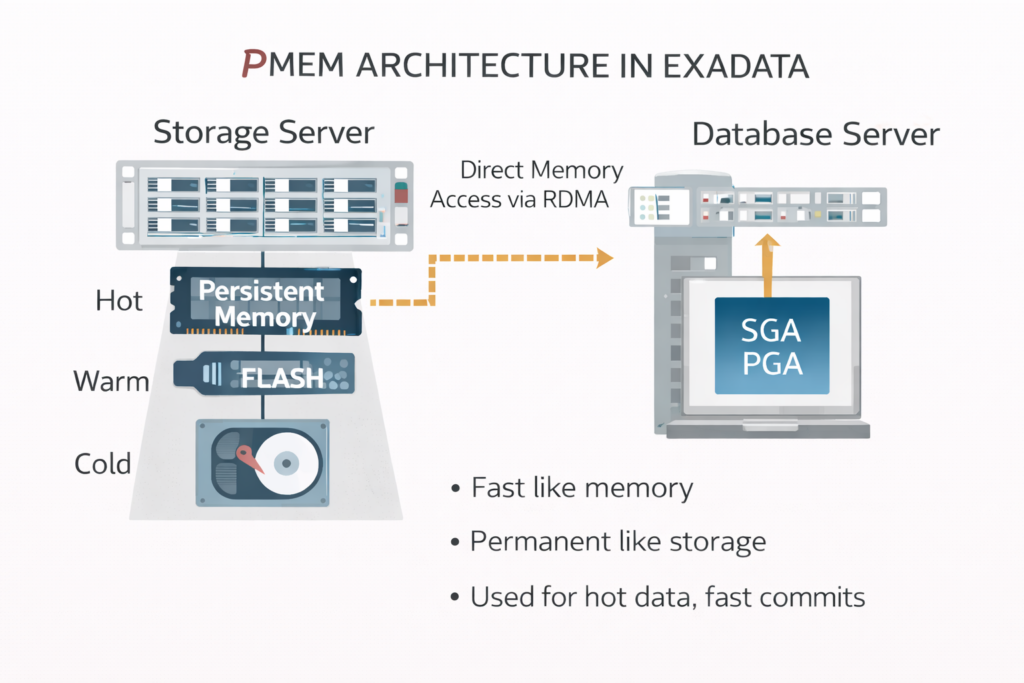
How Persistent Memory and RDMA Redefined Database I/O Performance Modern Oracle Exadata systems introduced a major shift in database I/O architecture with the use of Persistent Memory (PMEM) and Remote Direct Memory Access (RDMA). Together, these technologies significantly reduced I/O latency, CPU overhead, and data movement between storage and database servers. This blog explains what PMEM and RDMA are, why they were introduced, and how they work together in Exadata. Why traditional storage was no longer enough..? Before Exadata X8M, even with NVMe flash, database I/O followed this path: Storage → OS Kernel → TCP/IP → CPU → Database This introduced: Multiple memory copies Kernel context switches High CPU usage Network stack latency As databases became: More latency-sensitive (OLTP) Highly concurrent Mixed with analytics Flash alone could not deliver consistent microsecond performance. This led Oracle to introduce PMEM for speed and RDMA for transport. What is PMEM (Persistent Memory)? Persistent Memory (PMEM) is a storage-class memory technology that combines the speed of memory with the persistence of storage. Key characteristics of PMEM Non-volatile (data survives power loss) Much faster than NVMe flash Slower than DRAM, but close Byte-addressable In Exadata, PMEM is installed inside storage servers and is managed entirely by Exadata software. How PMEM is used in Exadata.? PMEM acts as a new tier in the storage hierarchy: Data Temperature Storage Tier Hot PMEM Warm NVMe Flash Cold Disk PMEM use cases in Exadata Caching frequently accessed data blocks Accelerating Smart Scan reads Speeding up redo log commits PMEM allows Exadata to keep hot data extremely close to the database, without sacrificing durability. What is RDMA (Remote Direct Memory Access)? RDMA is a networking technology that allows one server to directly access memory on another server, bypassing: Operating system kernel TCP/IP stack Remote CPU involvement Exadata uses RoCE (RDMA over Converged Ethernet). Key benefits of RDMA Microsecond-level latency Zero-copy data transfers Very low CPU usage Predictable performance under load RDMA is not storage or memory—it is the transport mechanism. Traditional I/O vs RDMA-based I/O Traditional TCP/IP I/O Storage → Kernel → CPU → Network → CPU → Kernel → Database RDMA-based I/O Storage Memory → Database Memory (Direct) RDMA removes multiple layers from the data path, making memory access across servers almost as fast as local access. How PMEM and RDMA work together in Exadata PMEM and RDMA solve different problems, but complement each other perfectly. PMEM provides a fast, persistent place to store data RDMA provides the fastest possible way to move that data Simplified architecture PMEM (Storage Server)    ↓ RDMA Database Server Memory With this design: Data is read directly from PMEM RDMA transfers it without CPU or kernel overhead Latency drops to microseconds PMEM + RDMA for read operations For large scans and analytics: Data resides in PMEM Database server requests data RDMA transfers data directly from PMEM Only relevant rows and columns are returned This dramatically reduces: I/O volume Database CPU usage Query response time PMEM + RDMA for write operations (commits) For commit-heavy OLTP workloads: Redo is written to PMEM (non-volatile) Commit is acknowledged immediately Data is later flushed to flash or disk asynchronously This results in: Faster commits Lower log file sync waits No loss of durability Why PMEM + RDMA was a breakthrough Together, PMEM and RDMA delivered: Up to 10x lower latency Higher throughput Better RAC scalability More predictable performance Most importantly: Performance gains came without application or schema changes. PMEM and RDMA scope in Exadata PMEM is available in:   Exadata X8M Exadata X9M RDMA remains a core transport technology in Exadata Both are fully integrated and automatically managed DBAs do not need to: Tune applications Modify SQL Manage memory tiers manually Simple analogy PMEM → A high-speed, persistent warehouse RDMA → A frictionless express highway Database server → The consumer of data The faster the warehouse and highway, the faster the business runs. One-line summary PMEM provides fast, persistent storage close to the database, and RDMA deliver it with minimal latency and CPU overhead. Final takeaway PMEM and RDMA together marked a fundamental redesign of database I/O in Oracle Exadata. Instead of pushing more data through traditional storage stacks, Exadata brought data: Closer to the database Faster than flash With minimal overhead This architecture laid the foundation for everything that followed in modern Exadata systems.

PMEM and RDMA in Oracle Exadata X8M and X9M Read More »

Oracle ASM rebalancing phases

Three Phases of Oracle ASM Rebalancing Operation

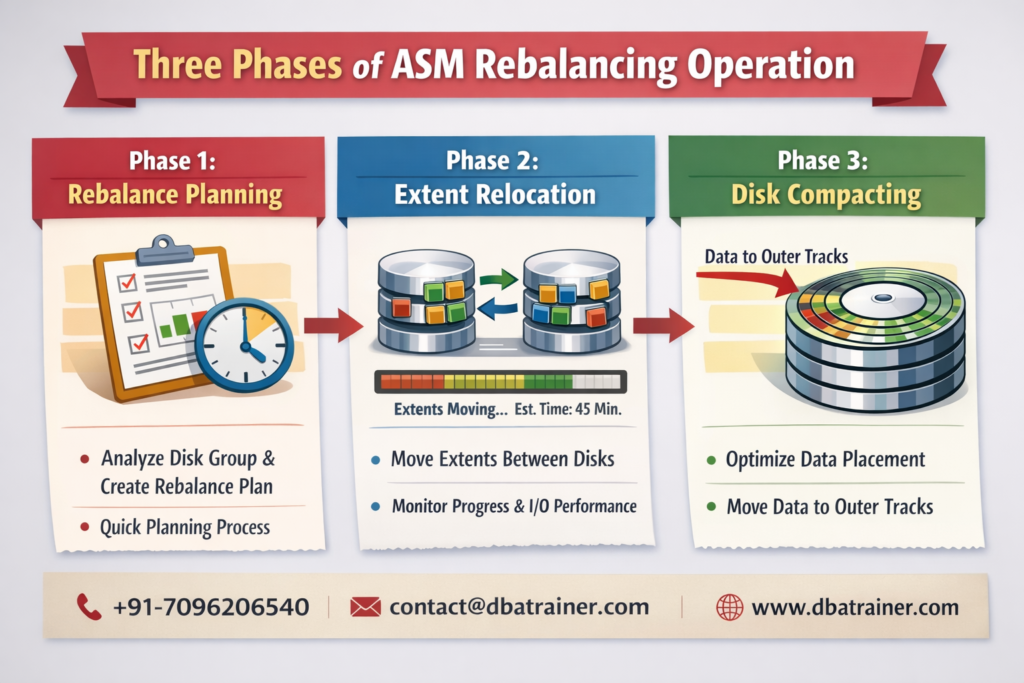
Learn the three phases of Oracle ASM rebalancing – planning, extent relocation, and disk compacting. Understand how ASM redistributes data efficiently with minimal downtime. Introduction Oracle Automatic Storage Management (ASM) provides high availability and optimal I/O performance by automatically managing disk storage. Whenever disks are added, dropped, or resized, ASM triggers a rebalance operation to evenly distribute data across the disk group. ASM rebalance is internally executed in three well-defined phases, ensuring efficiency and performance stability. Phase 1: Rebalance Planning In this initial phase, ASM analyzes the disk group and prepares a rebalance strategy. Key activities include: Identifying the rebalance trigger (ADD / DROP / RESIZE disk) Analyzing disk group size and number of files Determining which extents need redistribution This phase is lightweight and usually completes within a few minutes. Phase 2 : Extent Relocation This is the most time-consuming phase of the ASM rebalance process. What happens here: ASM moves data extents between disks to achieve uniform distribution I/O load is dynamically managed based on system performance Progress is continuously tracked DBAs can monitor the estimated completion time using: SELECT * FROM GV$ASM_OPERATION; This view provides EST_MINUTES, which is calculated dynamically based on I/O throughput and extent movement speed. Phase 3 : Disk Compacting Introduced in Oracle ASM 11.1.0.7 and later, this phase optimizes data placement. Purpose of disk compacting: Moves data closer to the outer tracks of disks Improves I/O performance Optimizes disk layout after rebalance completion This phase fine-tunes the disk group for long-term performance benefits. Conclusion The three-phase ASM rebalance mechanism ensures: Efficient data redistribution Minimal impact on database availability Optimized disk performance Understanding these phases helps DBAs plan maintenance activities and monitor rebalance operations effectively.

Three Phases of Oracle ASM Rebalancing Operation Read More »

ACMS – Atomic Controlfile to Memory Service

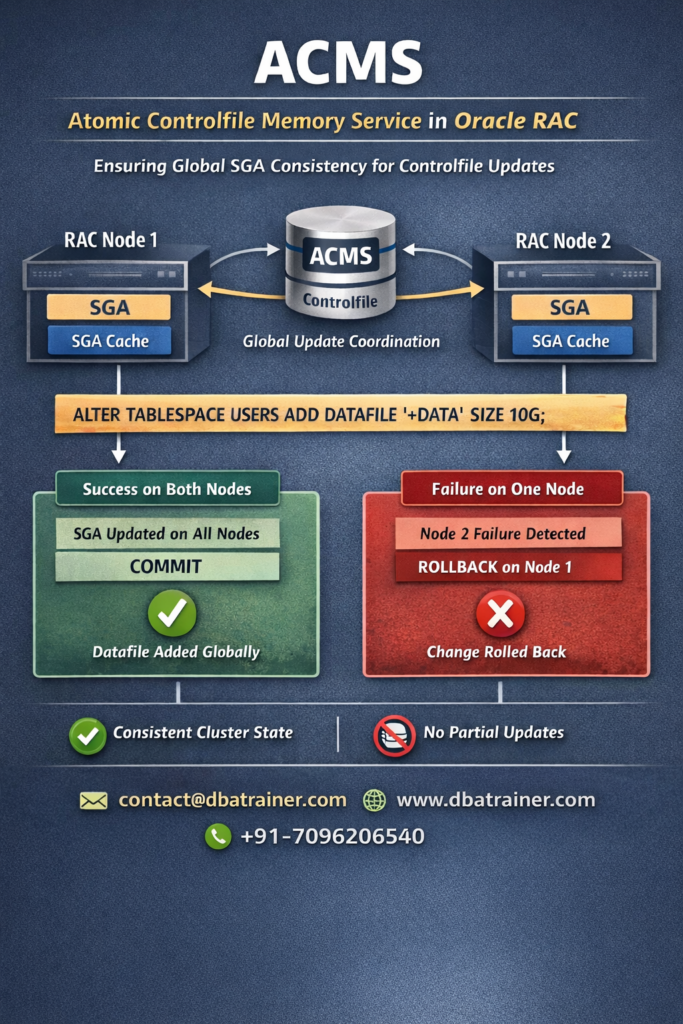
What ACMS is :- ACMS (Atomic Controlfile Memory Service) is an Oracle RAC background agent that ensures atomic and consistent updates of control-file–related metadata cached in the SGA across all RAC instances. In simple terms:When a control-file–related memory update occurs in RAC, ACMS guarantees that the update is either committed successfully on all instances or rolled back on all instances – never partially applied. This ensures cluster-wide consistency. Why ACMS Is Required in RAC :- In an Oracle RAC environment: If one instance updates its SGA and another instance fails mid-operation: ACMS prevents this by enforcing atomicity. What ACMS Protects :- ACMS ensures atomic updates for: Practical Example :- Scenario: Adding a Datafile in RAC Executed on RAC1: ALTER TABLESPACE users ADD DATAFILE ‘+DATA’ SIZE 10G; Internal Processing: Case 1: Successful Update ✅ Datafile visible on all instances✅ Cluster remains consistent Case 2: Failure on One Instance ❌ No partial update❌ No corruption✅ Cluster-wide consistency preserved What If ACMS Did Not Exist? Without ACMS: 👉 ACMS prevents this exact failure scenario. Relationship with Other RAC Services One-Line Answer 💡 ACMS ensures atomic, cluster-wide consistency of control-file–related SGA updates in Oracle RAC by committing changes globally or rolling them back on failure.  

ACMS – Atomic Controlfile to Memory Service Read More »

🧱 Blockchain Tables in Oracle Database

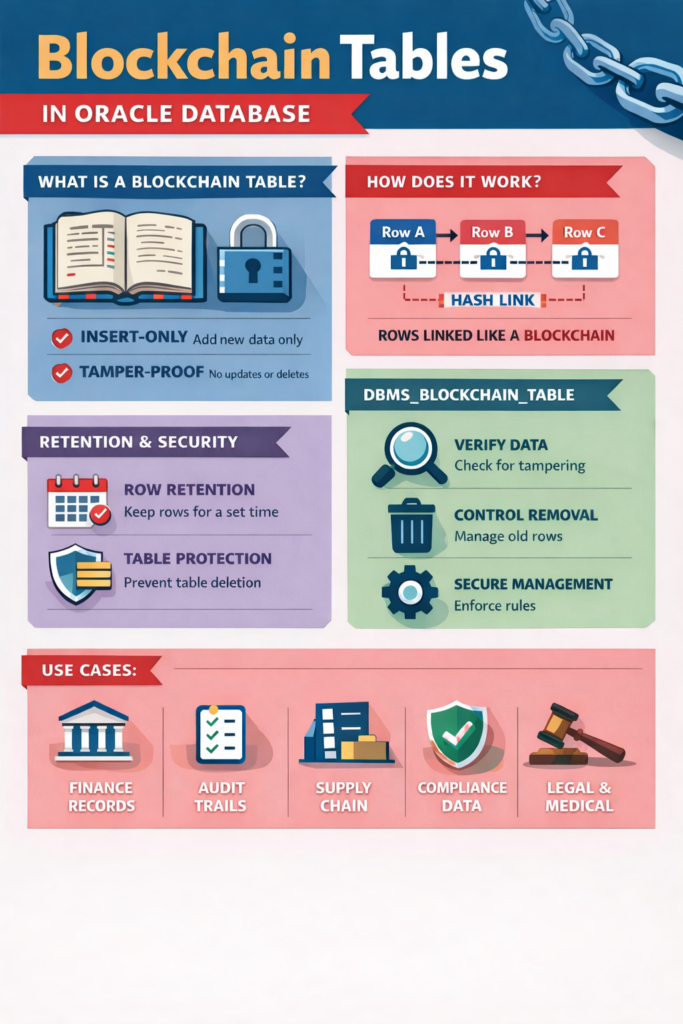
Oracle Database introduced a powerful feature called Blockchain Tables. This feature helps store data in a secure, tamper-proof, and trustworthy way, directly inside the Oracle Database. What Is a Blockchain Table? A Blockchain Table is a special type of Oracle table where: You can only insert new data Existing data cannot be updated or deleted Data becomes permanent and tamper-proof Once data is written, it stays exactly the same – forever or for a defined period. Why Did Oracle Introduce Blockchain Tables? In many systems, data trust is critical. Examples: Financial transactions Audit logs Compliance records Medical or legal records Traditional tables allow: UPDATE DELETE TRUNCATE This means data can be changed or manipulated. Blockchain tables solve this problem by enforcing immutability at the database level. How Blockchain Tables Work (Step by Step) Let’s understand this in a simple way: Step 1: Insert-Only Design Oracle allows only INSERT operations UPDATE and DELETE are blocked by design Step 2: Row Chaining (Like a Blockchain) Each row is linked to the previous row Oracle calculates a cryptographic hash for every row That hash includes:   The row’s data The hash of the previous row This creates a chain of rows Step 3: Tamper Detection If someone tries to change old data: The hash chain breaks Oracle immediately detects the tampering This guarantees data integrity and trust Retention Policies (Very Important Concept) Blockchain tables use retention rules to control how long data is protected. Row Retention Defines how long each row must stay unchanged Rows cannot be deleted before this period ends Can be:   Permanent Time-based (example: 30 days, 1 year, etc.) Table Retention Protects the entire table Prevents accidental or unauthorized table drop Table can only be dropped under strict conditions These rules ensure long-term protection of important data What You Cannot Do with Blockchain Tables Because they are designed for trust and security: You cannot update rows You cannot delete rows You cannot truncate the table You cannot drop the table easily You cannot modify table structure freely These limitations are intentional, not drawbacks What Is DBMS_BLOCKCHAIN_TABLE? DBMS_BLOCKCHAIN_TABLE is a special Oracle-supplied package that helps you manage blockchain tables safely. Since blockchain tables are highly restricted, Oracle does not allow normal operations for many tasks.Instead, Oracle provides this package to handle controlled and secure management. What Does DBMS_BLOCKCHAIN_TABLE Do? This package allows administrators to: Verify Blockchain Integrity Checks whether the blockchain table data has been tampered with Validates the hash chain from start to end Control Row Deletion (After Retention) Rows cannot be deleted manually After the retention period expires, Oracle can remove eligible rows This happens only through approved mechanisms Secure Lifecycle Management Ensures blockchain rules are enforced Prevents misuse or bypassing of protection In simple words: DBMS_BLOCKCHAIN_TABLE is the official and safe way Oracle allows interaction with blockchain tables — without breaking trust.   Real-World Use Cases Blockchain tables are ideal for: Financial transaction logs Audit trail Supply chain records Compliance data Security logs Legal or medical records Anywhere data trust matters, blockchain tables shine. Key Takeaways Blockchain tables are insert-only Data is immutable and tamper-proof Oracle uses hash chaining internally Retention rules protect rows and tables DBMS_BLOCKCHAIN_TABLE ensures secure management and verification

🧱 Blockchain Tables in Oracle Database Read More »

Oracle GoldenGate Microservices Architecture (MA)

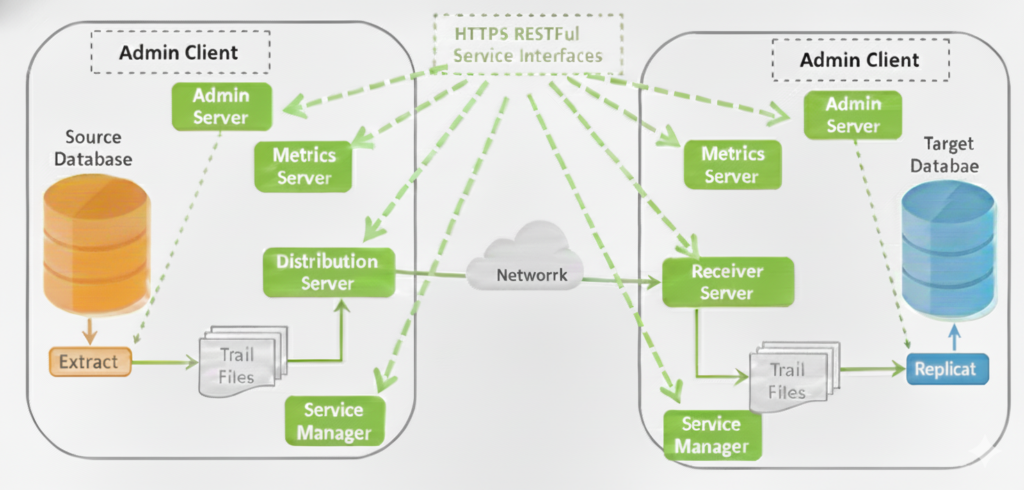
Oracle GoldenGate Microservices Architecture (OGG MA) was introduced starting with Oracle GoldenGate 12.3 to modernize replication management, improve security, enable automation, and simplify large-scale GoldenGate deployments. Oracle GoldenGate Microservices Architecture is a service-oriented deployment model where each GoldenGate function runs as an independent service. Instead of tightly coupled background processes (Manager, Collector, Data Pump), MA uses dedicated servers that communicate using secure RESTful APIs over HTTPS. This design enables: Centralized management Better fault isolation Easier upgrades Automation and DevOps integration Core Components of Oracle GoldenGate Microservices Architecture:- OGG MA consists of five core services plus the Admin Client. Each service has a clear and well-defined role. 1. Service Manager – The Watchdog Supervisor Service Manager is the central watchdog and entry point for Oracle GoldenGate Microservices Architecture. Manages one or multiple GoldenGate deployments on a host One Service Manager supports multiple Administration Services Can run: Manually As a Daemon Integrated with XAG Agent Used to: Start/stop deployments Manage users, certificates, and security profiles Access all microservices (Admin, Distribution, Receiver, Metrics) Monitor logs and enable debug tracing  Each GoldenGate installation has only ONE Service Manager 2. Administration Service – The Central Brain Administration Service is the control plane of a GoldenGate deployment. Manages Extract and Replicat processes Provides REST API and Web UI Allows: Create, start, stop, alter Extracts & Replicats Manage parameter files, checkpoints, reports Configure supplemental logging Manage credential store and encryption keys Admin Client communicates with this service using REST APIs 3. Distribution Service – Modern Data Pump Distribution Service handles source-side trail distribution. Replaces classic Data Pump Extract Sends trail files to one or more targets Supports: WebSockets (HTTPS) UDP Classic OGG protocol (for interoperability) Performs routing only (no transformations or filtering) Supports proxy and cloud environments 4. Receiver Service – Modern Collector Receiver Service is the target-side trail receiver. Replaces classic Collector Receives trails from Distribution Service Supports: WebSockets (default) UDP Classic OGG protocol 5. Performance Metrics Service – Monitoring & Observability Performance Metrics Service provides centralized monitoring. Collects metrics from all GoldenGate processes Enables: Performance monitoring Resource utilization tracking Error and status visibility Integrates with third-party monitoring tools Metrics storage is separate from Admin metadata 6. Admin Client – Command Line Interface for MA The Admin Client is the command-line alternative to the web UI, similar to GGSCI but designed for Microservices Architecture. Communicates with Administration Server using REST APIs Create and manage Extracts and Replicats Start and stop processes View lag, status, and reports Summary Table – Classic vs Microservices Components :- Microservice Component Purpose Classic Equivalent Service Manager Deployment and Service Watchdog No Direct Equivalent Administration Server Central control Manager Distribution Server Sends trails Data Pump Receiver Server Receiver trails Collector Performance Metrics Server Monitoring Monitoring datastore Admin Client CLI Control GGSCI

Oracle GoldenGate Microservices Architecture (MA) Read More »