
Oracle RAC + Data Guard – The Perfect Architecture for Mission Critical Databases
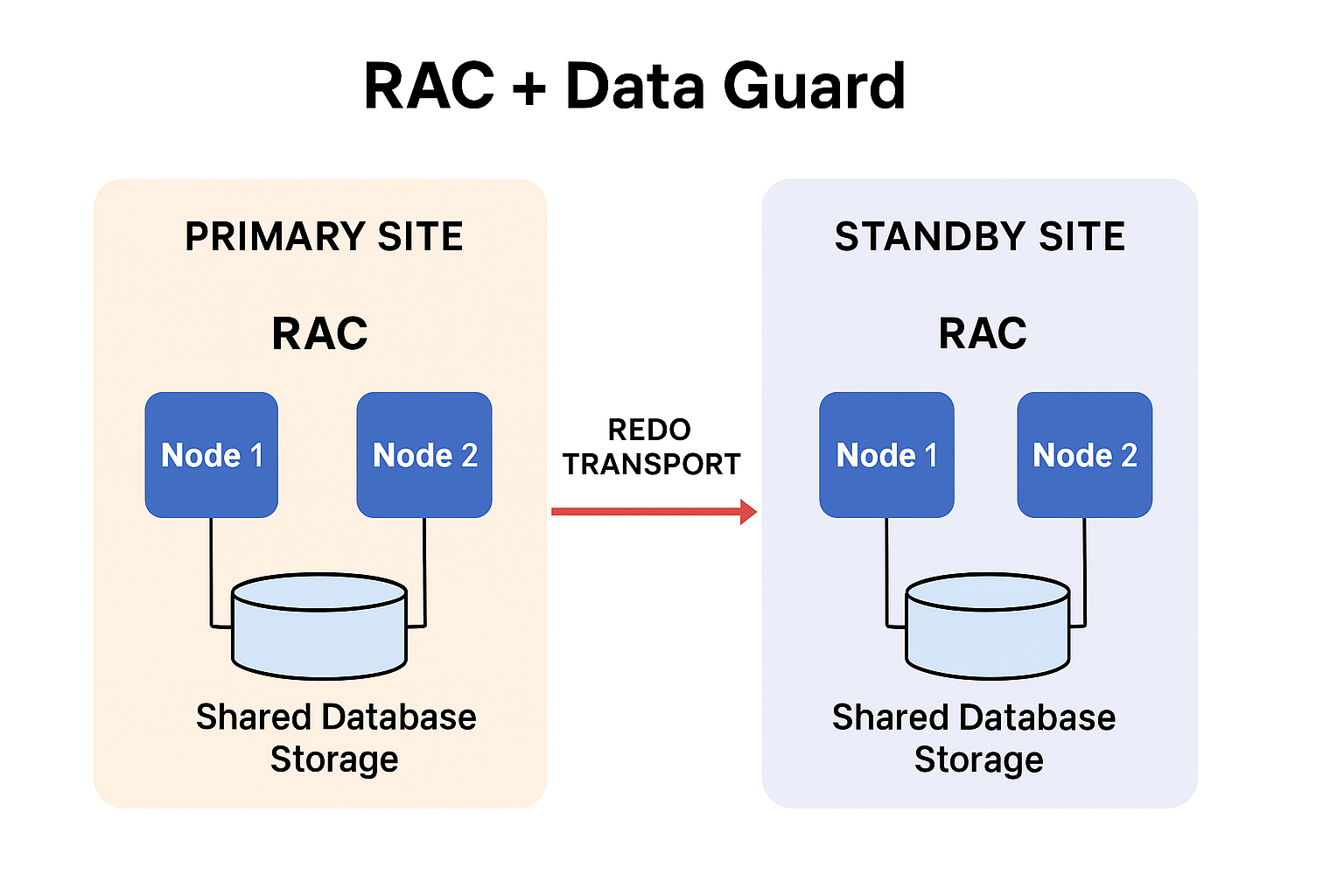
Oracle RAC in the Primary – Availability, Scalability & Load Sharing Oracle RAC in the primary site delivers three major advantages: High Availability (HA) If one database server/node fails, another node continues serving users. Database stays online Sessions re-route to surviving nodes No outage for applications Planned maintenance can be done node-by-node Result: Continuous availability for the primary database Scalability Multiple nodes work together as a single database. Add more nodes when user load increases Increase throughput without downtime Ideal for large OLTP workloads Result: System capacity grows as business demands grow Load Balancing User connections automatically spread across multiple RAC nodes. No single-node overload Balanced CPU & memory usage Better response time during peak hours Result: Efficient resource utilization and stable performance Data Guard Standby RAC – Disaster Recovery & Workload Offloading Data Guard with RAC on the standby site provides powerful advantages: Disaster Recovery (DR) If the entire primary site fails: Standby RAC becomes the new primary Minimal downtime (seconds to minutes) Minimal or zero data loss (SYNC/ASYNC mode) Result: Business continues even if the main site is lost Offloading Workloads (Active Data Guard) The standby RAC database can run real workloads, not just sit idle. You can offload: Reporting BI queries Long read-only operations Backup jobs ETL extractions Result: Primary RAC focuses on OLTP while standby handles heavy reads This significantly improves performance and reduces resource pressure on the primary site. Combined Outcome – What RAC + Data Guard Deliver Together Using both gives unmatched resilience: Near-zero downtime Node failure → RAC handles it Site failure → Data Guard handles it. Predictable performance Workload spread across nodes Scalable growth Add RAC nodes or standby nodes anytime Better resource utilization Move reporting & heavy reads to standby End-to-end resilience Highly available primary + disaster-protected secondary So Here , Oracle RAC and Data Guard together provide an enterprise-class foundation that eliminates single points of failure, keeps systems responsive under growing workloads, and protects data against site-level failures. RAC handles node-level resilience and performance, while Data Guard ensures site-level continuity and operational efficiency through offloading. When implemented correctly, this architecture delivers unmatched uptime, flexibility, and operational confidence.
Oracle RAC + Data Guard – The Perfect Architecture for Mission Critical Databases Read More »