Oracle GoldenGate Microservices Architecture (MA)
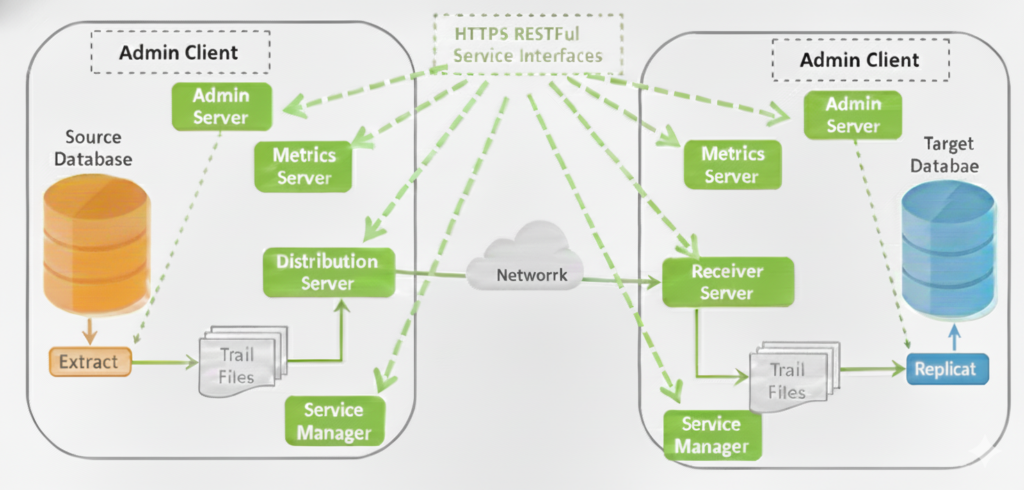
Oracle GoldenGate Microservices Architecture (OGG MA) was introduced starting with Oracle GoldenGate 12.3 to modernize replication management, improve security, enable automation, and simplify large-scale GoldenGate deployments. Oracle GoldenGate Microservices Architecture is a service-oriented deployment model where each GoldenGate function runs as an independent service. Instead of tightly coupled background processes (Manager, Collector, Data Pump), MA uses dedicated servers that communicate using secure RESTful APIs over HTTPS. This design enables: Centralized management Better fault isolation Easier upgrades Automation and DevOps integration Core Components of Oracle GoldenGate Microservices Architecture:- OGG MA consists of five core services plus the Admin Client. Each service has a clear and well-defined role. 1. Service Manager – The Watchdog Supervisor Service Manager is the central watchdog and entry point for Oracle GoldenGate Microservices Architecture. Manages one or multiple GoldenGate deployments on a host One Service Manager supports multiple Administration Services Can run: Manually As a Daemon Integrated with XAG Agent Used to: Start/stop deployments Manage users, certificates, and security profiles Access all microservices (Admin, Distribution, Receiver, Metrics) Monitor logs and enable debug tracing Each GoldenGate installation has only ONE Service Manager 2. Administration Service – The Central Brain Administration Service is the control plane of a GoldenGate deployment. Manages Extract and Replicat processes Provides REST API and Web UI Allows: Create, start, stop, alter Extracts & Replicats Manage parameter files, checkpoints, reports Configure supplemental logging Manage credential store and encryption keys Admin Client communicates with this service using REST APIs 3. Distribution Service – Modern Data Pump Distribution Service handles source-side trail distribution. Replaces classic Data Pump Extract Sends trail files to one or more targets Supports: WebSockets (HTTPS) UDP Classic OGG protocol (for interoperability) Performs routing only (no transformations or filtering) Supports proxy and cloud environments 4. Receiver Service – Modern Collector Receiver Service is the target-side trail receiver. Replaces classic Collector Receives trails from Distribution Service Supports: WebSockets (default) UDP Classic OGG protocol 5. Performance Metrics Service – Monitoring & Observability Performance Metrics Service provides centralized monitoring. Collects metrics from all GoldenGate processes Enables: Performance monitoring Resource utilization tracking Error and status visibility Integrates with third-party monitoring tools Metrics storage is separate from Admin metadata 6. Admin Client – Command Line Interface for MA The Admin Client is the command-line alternative to the web UI, similar to GGSCI but designed for Microservices Architecture. Communicates with Administration Server using REST APIs Create and manage Extracts and Replicats Start and stop processes View lag, status, and reports Summary Table – Classic vs Microservices Components :- Microservice Component Purpose Classic Equivalent Service Manager Deployment and Service Watchdog No Direct Equivalent Administration Server Central control Manager Distribution Server Sends trails Data Pump Receiver Server Receiver trails Collector Performance Metrics Server Monitoring Monitoring datastore Admin Client CLI Control GGSCI
Oracle GoldenGate Microservices Architecture (MA) Read More »